偶尔用到的实用工具类
jaudiotagger工具包获取、设置音频信息
jaudiotagger 是一个用于读取和修改音频文件元数据(metadata)的 Java 库。它支持多种音频格式,包括但不限于:
MP3
FLAC
OGG
WAV
M4A/AAC
这个库允许你访问并编辑音频文件中的标签信息,例如:
歌曲标题 (Title)
艺术家 (Artist)
专辑 (Album)
封面图片 (Cover Art)
音轨号 (Track Number)
年份 (Year)
引入Jar包
Maven
<dependency>
    <groupId>org</groupId>
    <artifactId>jaudiotagger</artifactId>
    <version>2.0.3</version>
 </dependency>
Gradle
implementation "org:jaudiotagger:2.0.3"读取、设置.mp3文件的元数据信息
说明
jaudiotagger 包中的 org.jaudiotagger.tag.FieldKey 枚举类中包含了音频文件的各个元数据字段,读写时请使用枚举类进行操作。
示例代码
public class Mp3Test {

    public static void main(String[] args) throws IOException {
        String filePath = "D:\\test.mp3";
        HashMap<FieldKey, String> fieldMap = new HashMap<>(8);
        fieldMap.put(FieldKey.ARTIST, "朝花夕拾");
        fieldMap.put(FieldKey.YEAR, "2025");
        fieldMap.put(FieldKey.TITLE, "朝花夕拾");
        writeMP3FileTagInfo(filePath, fieldMap);
        Map<FieldKey, String> result = readMP3FileTagInfo(filePath, Arrays.asList(FieldKey.ARTIST, FieldKey.TITLE, FieldKey.YEAR));
        System.out.println(result);
        // {ARTIST=朝花夕拾, TITLE=朝花夕拾, YEAR=2025}
    }

    /**
     * 读取MP3文件元数据信息
     * @param filePath 文件路径
     * @param fieldKeys 需要读取的元数据字段
     * @return 元数据信息
     */
    public static Map<FieldKey, String> readMP3FileTagInfo(String filePath, List<FieldKey> fieldKeys) {
        try {
            MP3FileReader fileReader = new MP3FileReader();
            AudioFile read = fileReader.read(new File(filePath));
            Tag fileTag = read.getTag();
            HashMap<FieldKey, String> result = new HashMap<>(8);
            for (FieldKey fieldKey : fieldKeys) {
                result.put(fieldKey, fileTag.getFirst(fieldKey));
            }
            return result;
        } catch (IOException | TagException | ReadOnlyFileException | InvalidAudioFrameException e) {
            throw new RuntimeException(e);
        }
    }

    /**
     * 设置指定元数据信息
     * @param filePath 文件路径
     * @param fieldMap 元数据信息
     */
    public static void writeMP3FileTagInfo(String filePath, Map<FieldKey, String> fieldMap) {
        try {
            MP3FileReader fileReader = new MP3FileReader();
            AudioFile read = fileReader.read(new File(filePath));
            Tag fileTag = read.getTag();
            for (FieldKey fieldKey : fieldMap.keySet()) {
                fileTag.setField(fieldKey, fieldMap.get(fieldKey));
            }
            read.commit();
        } catch (IOException | TagException | ReadOnlyFileException | InvalidAudioFrameException |
                 CannotWriteException e) {
            throw new RuntimeException(e);
        }
    }
}
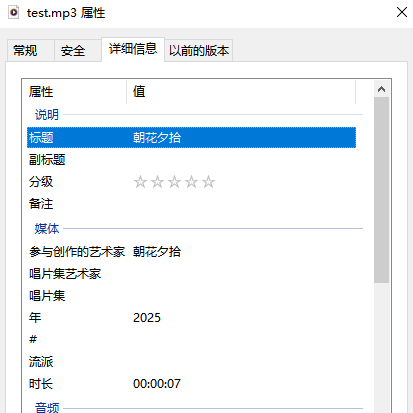
运行结果:
设置.wav文件作者(艺术家)信息
示例代码
public class WavTest {

    public static void main(String[] args) throws IOException {
        // 原始WAV文件路径
        String inputFile = "D:\\test.wav";
        addMetadataToWavInPlace(inputFile, "朝花夕拾");
    }

    /**
     * 直接在原WAV文件末尾添加元数据信息(不创建新文件)
     *
     * @param filePath WAV文件路径
     * @param author   作者信息
     * @throws IOException e
     */
    public static void addMetadataToWavInPlace(String filePath, String author) throws IOException {
        try (RandomAccessFile raf = new RandomAccessFile(filePath, "rw"); ByteArrayOutputStream infoStream = new ByteArrayOutputStream()) {
            // 获取文件长度
            long fileLength = raf.length();
            // 定位到文件末尾
            raf.seek(fileLength);
            // 写入LIST标识符
            infoStream.write("LIST".getBytes());
            // 占位符长度
            byte[] lengthPlaceholder = new byte[4];
            infoStream.write(lengthPlaceholder);
            // 写入INFO标识符
            infoStream.write("INFO".getBytes());
            // 写入IART chunk (艺术家/作者) - 改进编码处理
            byte[] authorBytes = author.getBytes("GBK");
            writeChunk(infoStream, "IART", authorBytes);

            // 获取INFO chunk数据
            byte[] infoData = infoStream.toByteArray();
            // 更新长度字段
            int dataLength = infoData.length - 8;
            ByteBuffer lengthBuffer = ByteBuffer.allocate(4);
            lengthBuffer.order(ByteOrder.LITTLE_ENDIAN);
            lengthBuffer.putInt(dataLength);
            System.arraycopy(lengthBuffer.array(), 0, infoData, 4, 4);
            // 写入INFO chunk到原文件末尾
            raf.write(infoData);
            // 更新RIFF chunk的总长度
            updateRiffChunkSize(raf, fileLength + infoData.length);
        }
    }

    /**
     * 更新RIFF chunk的总长度
     */
    private static void updateRiffChunkSize(RandomAccessFile raf, long newFileSize) throws IOException {
        // RIFF长度字段位置
        raf.seek(4);
        ByteBuffer lengthBuffer = ByteBuffer.allocate(4);
        lengthBuffer.order(ByteOrder.LITTLE_ENDIAN);
        // RIFF长度不包括前8字节
        lengthBuffer.putInt((int) (newFileSize - 8));
        raf.write(lengthBuffer.array());
    }


    private static void writeChunk(ByteArrayOutputStream stream, String id, byte[] data) throws IOException {
        stream.write(id.getBytes());
        // 写入数据长度 - 对于文本字段需要包含null终止符
        int actualLength = data.length + 1; // 加上null终止符
        // 如果加上null后长度为奇数,需要再加一个填充字节
        if (actualLength % 2 != 0) {
            actualLength++;
        }
        ByteBuffer lengthBuffer = ByteBuffer.allocate(4);
        lengthBuffer.order(ByteOrder.LITTLE_ENDIAN);
        lengthBuffer.putInt(actualLength);
        stream.write(lengthBuffer.array());
        // 写入实际数据
        stream.write(data);
        // 写入null终止符
        stream.write(0);

        // 如果数据长度+null终止符后为奇数,需要填充一个字节以保持偶数字节对齐
        if ((data.length + 1) % 2 != 0) {
            // 填充字节
            stream.write(0);
        }
    }
}
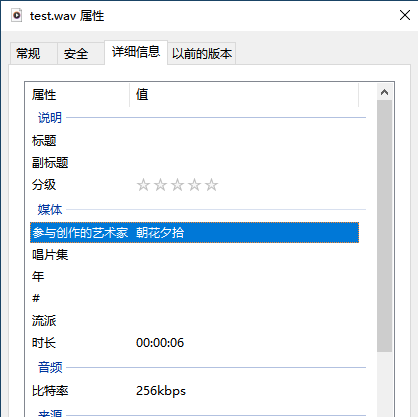
执行完成后可以看到正确的设置了作者(艺术家)信息:
评论
匿名评论
隐私政策
你无需删除空行,直接评论以获取最佳展示效果